
 New -60%
Indian Wedding Planner & Budget Tracker
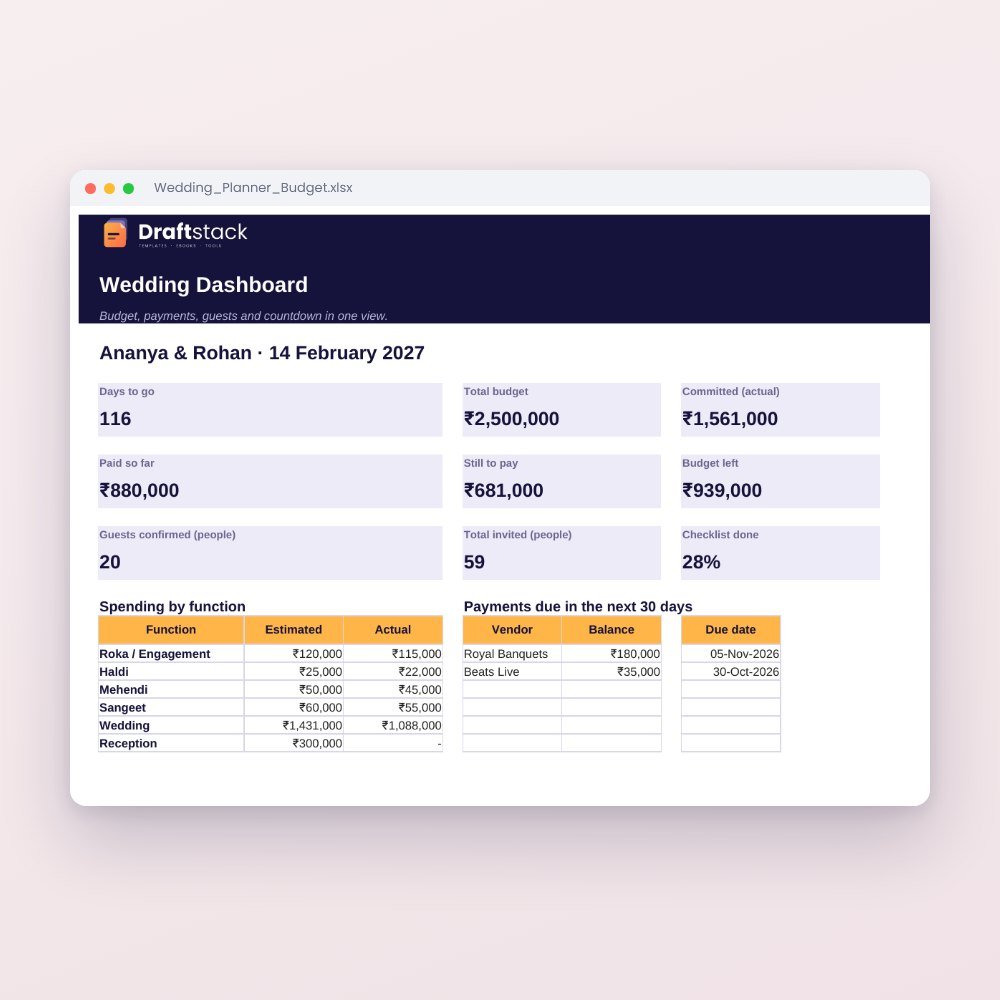
Plan every function from Roka to Reception: budget by function, vendor payments and due dates, guest list with RSVP, and a month-by-month checklist that dates itself.
₹199₹499Save ₹300 (60%)
Inclusive of all taxes · One-time payment · Instant download
Extra 20% off with code LAUNCH20 at checkout
Instant downloadOn screen + email
Secure paymentUPI · Cards · Net Banking
7-day helpFix or refund if faulty
Perfect for
Couples planning their weddingParents and family plannersWedding planners
What you get2 × .xlsx (blank + sample)
Works withMicrosoft Excel · Google Sheets · WPS Office
DeliveryInstant download
LicencePersonal & own-business use
Weddings have hundreds of small payments, dozens of vendors and a guest list that keeps changing. This planner keeps all of it in one place, so the family can relax and enjoy the celebrations.
Highlights
- Budget by function: Roka, Haldi, Mehendi, Sangeet, Wedding, Reception
- Estimated vs actual vs paid, with over-budget alerts
- Vendor tracker with contact, advance, balance and next payment date; payments due within 7 days turn red
- Guest list by side and relation, with headcount, functions invited and RSVP
- Checklist from 12 months to 1 week before, with due dates calculated from your wedding date
- Dashboard with countdown, budget left, payments due and charts
Share it on Google Sheets so the whole family updates the same file.
What's inside
Everything you get
01
Dashboard
Days to go, budget left, paid vs pending, guests confirmed, payments due in 30 days
02
Budget
17 common categories ready; add your own
03
Vendors
Contacts, deal value, advance, balance, due dates and status
04
Guest List
Up to 500 families with headcount, functions and RSVP
05
Checklist
32 tasks with automatic due dates plus space for your own
Files in your download
- Wedding_Planner_Budget.xlsx267 KB
- Wedding_Planner_Budget_SAMPLE.xlsx269 KB
How to use
Start in 5 simple steps
A step-by-step guide is also included inside your download.
- 1
Enter the basics
Couple names, wedding date, total budget and guests
- 2
Set estimates
For each category and function
- 3
Add vendors
As you book them, with advance and next payment date
- 4
Build the guest list
Update RSVPs as replies come in
- 5
Follow the checklist
Tick tasks as you go; check the dashboard weekly
FAQ
Questions about this product
Can the family edit it together?
Yes. Upload it to Google Sheets and share the link.
Are the functions fixed?
No. You can rename them or use 'Other / General'.
Is it only for Hindu weddings?
No. Rename any function or category to suit your traditions.
How do I get the files after payment?
A download button appears on screen right after payment, and the link is emailed to you. You can also download again any time from My account.
Can I use it on my phone?
Yes. It works with Microsoft Excel, Google Sheets, WPS Office. Free mobile apps are enough.
What if something does not work?
Write to us within 7 days with your order number. We will fix it, send a working file, or refund you.
Our promiseEvery file is tested before launch. If something doesn't work, we fix it or refund you within 7 days. Refund policy
More to explore
You may also like
New -60%
 -58%
-58%
 New -57%
 -57%
-57%