WhatsApp
 Pinterest
 New
New
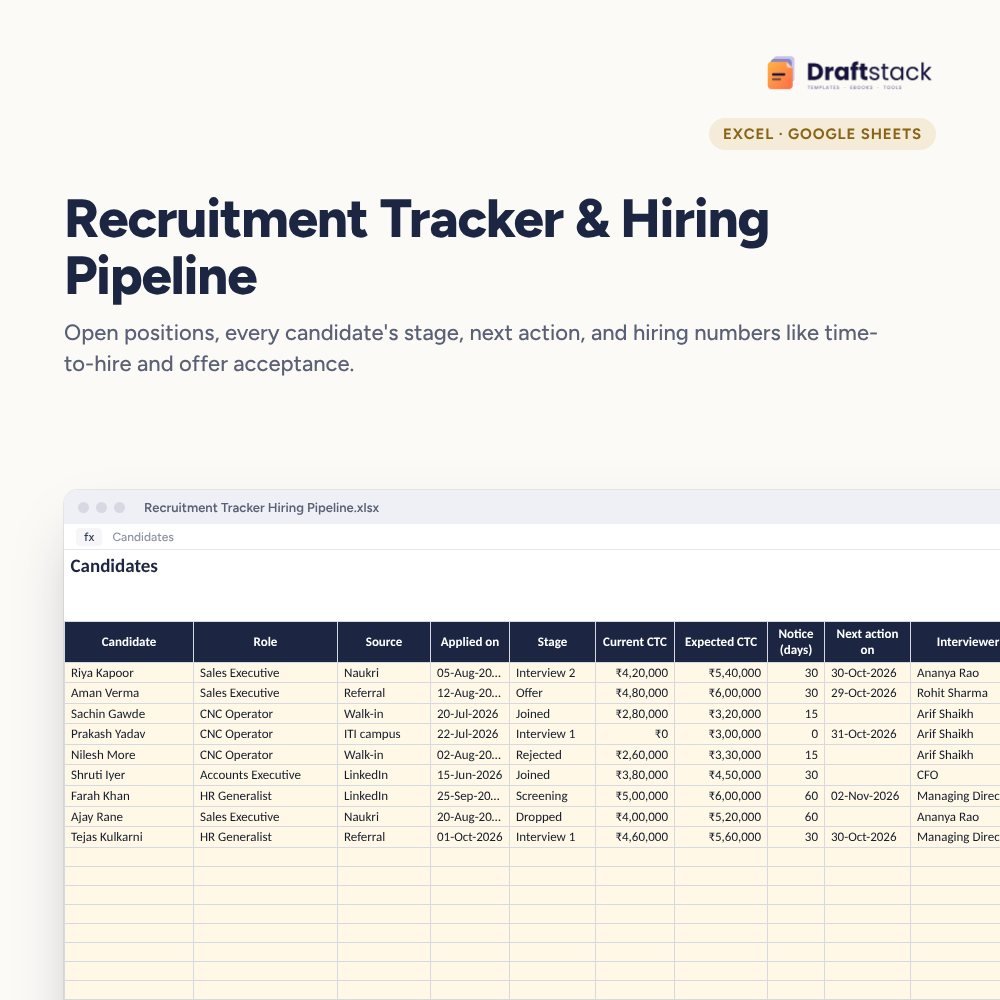
Recruitment Tracker & Hiring Pipeline (Excel)
Run hiring without losing candidates: open positions with budgets, every candidate's stage, expected CTC and next action date, plus a funnel, the sources that bring joiners, time to fill and offer acceptance.
₹349₹799Save ₹450 (56%)
Inclusive of all taxes · One-time payment · Instant download
1 offer for you
Instant downloadOn screen + email
Secure paymentUPI · Cards · Net Banking
7-day helpFix or refund if faulty
Perfect for
HR teams and recruitersFounders hiring their first 50 peopleHiring managers in growing companies
What you get2 × .xlsx (blank + sample)
Works withMicrosoft Excel · Google Sheets · WPS Office
DeliveryInstant download
LicencePersonal & own-business use
Frequently bought together
This item: Recruitment Tracker & Hiring Pipeline (Excel)₹349 Employee Training Matrix & Skill Gap Tracker (Excel)₹299Employee Database & HR Master Sheet (Excel)₹299
All three: ₹852₹947Extra 10% off
Made for India
Amounts in ₹Money columns are already set to rupees.
Share on WhatsAppSend it straight to family or customers.
Priced in rupeesPay in ₹. Download right after payment.
Good candidates are lost to slow replies and forgotten follow-ups, not to bad interviews. Without an applicant tracking system, most small companies hire from inboxes and WhatsApp. This tracker gives the hiring team one shared view.
What it does
- Positions: role, department, openings, CTC budget, date opened, hiring manager, status, candidates and joiners, and days open (red after 60)
- Candidates: role (from open positions), source, applied date, stage, current and expected CTC, notice period, next action date and interviewer
- Alerts: overdue follow-ups, follow-ups due today and expected CTC over the role's budget
- Dashboard: open positions, active candidates, offer acceptance, average time to fill, hiring funnel and the sources that bring joiners
Fits small HR teams
Share it in Google Sheets with hiring managers so everyone updates the same file.
What's inside
Everything you get
01
Positions
50 roles with budget and days open
02
Candidates
500 candidates with alerts
03
Dashboard
Funnel, sources and hiring numbers
04
Blank + sample
Sample with four roles
Files in your download
- XLSXRecruitment_Tracker_Hiring_Pipeline.xlsx54 KB
- XLSXRecruitment_Tracker_Hiring_Pipeline_SAMPLE.xlsx55 KB
How to use
Start in 5 simple steps
A step-by-step guide is also included inside your download.
- 1
Add positions
With CTC budget
- 2
Add candidates
Source and stage
- 3
Set next actions
Every candidate
- 4
Clear overdue follow-ups
Daily
- 5
Review sources
Monthly
FAQ
Questions about this product
Is this an ATS?
It covers what most small companies need from an applicant tracking system: positions, candidates, stages and follow-ups, without the cost.
How is offer acceptance worked out?
Joined ÷ (joined + dropped after offer + offers pending). It shows how many offers turn into joiners.
Can I add my own stages?
Yes. Edit the Stage list on the Lists sheet; the funnel uses the same names.
How do I store CVs?
Keep CVs in a shared folder and paste the link in the candidate's row or notes.
Is candidate data safe here?
Share it only with the hiring team and delete details of rejected candidates after a reasonable period, in line with data protection rules.
How do I get the files after payment?
A download button appears on screen right after payment, and the link is emailed to you. You can also download again any time from My account.
Can I use it on my phone?
Yes. It works with Microsoft Excel, Google Sheets, WPS Office. Free mobile apps are enough.
What if something does not work?
Write to us within 7 days with your order number. We will fix it, send a working file, or refund you.
Our promiseEvery file is tested before launch. If something doesn't work, we fix it or refund you within 7 days. Refund policy
Complete the set
Goes well with this
New
 New
New
 Trending
 New
New
Excel & Sheets
House Help Salary & Attendance Register (Excel): Maid, Cook, Driver, Nanny
₹99₹24960% off